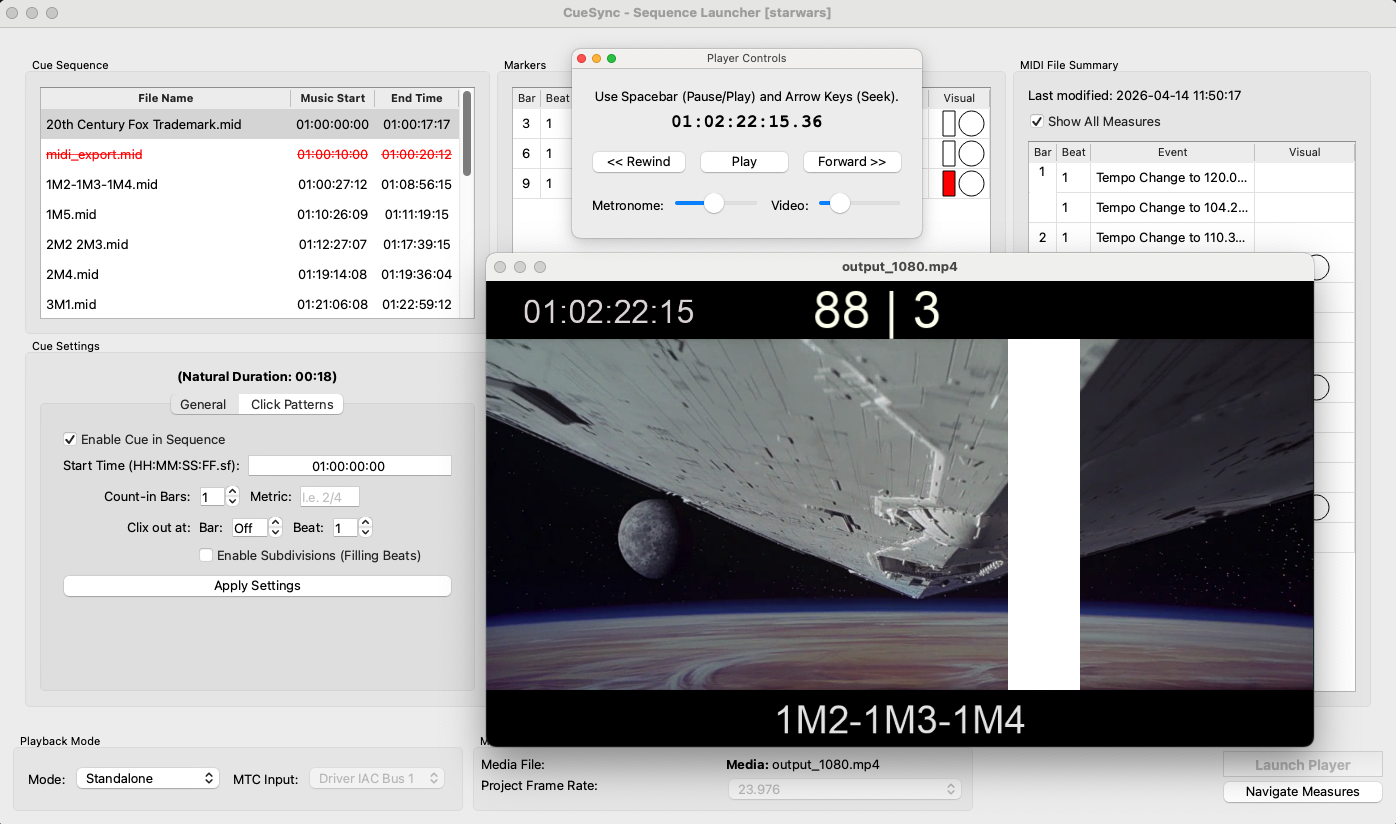
If you came here after opening your old streamers-and-punches app and finding it won't launch, you're not alone. The streamers-and-punches method itself is as useful as it ever was — it's still the clearest way to keep a conductor, players and picture locked together on a scoring stage. The problem isn't the technique. It's that the software many composers and music editors relied on for years was built for another era of the Mac.
This guide explains why those tools stopped working, what to look for in a replacement, and how to get the same workflow running on a modern Mac.
Why Figure 53 Streamers and Auricle stopped fitting modern workflows
Two separate things happened, and it's worth knowing which one is biting you.
Figure 53 Streamers is a 32-bit app
Streamers was, for a long time, the accessible standard for this job. But it's a 32-bit application that targets older macOS releases. When Apple dropped 32-bit support, apps like it simply stopped opening on current systems. It's still available as an unsupported free download, but if your Mac is anything recent, it won't run — and there's no 64-bit version to move to.
Auricle predates the modern Mac entirely
Auricle earned its place in film-scoring history — it's the tool a generation of composers used for streamers, punches and timing math. But it's a DOS-era system. If you're trying to fit it into a session driven by Logic, Cubase, Pro Tools or Digital Performer, you're bridging decades of technology, and the friction shows.
The workflow is fine. It's the plumbing underneath it that needs replacing.
What to look for in a replacement
Before you switch, make sure whatever you choose actually covers the parts of the job you rely on. At minimum:
- Native, current macOS support — 64-bit, runs on today's systems, no compatibility layer.
- Streamers and punches on a timeline — placed by bar and beat, not hand-programmed event by event.
- A stable clicktrack — including accent patterns for irregular meters.
- DAW sync over MTC — so picture, click and visuals all follow one transport.
- A standalone mode — for rehearsals and spotting sessions with no DAW in the room.
- Real-time overlays and video export — watch cues live, or hand off a burned-in MP4.
How CueSync covers the streamers-and-punches workflow
CueSync is a native macOS app built specifically for this. Here's how it maps onto what you were doing before:
| What you need | In CueSync |
|---|---|
| Streamers & punches | Placed directly on the MIDI timeline in the Marker Editor, with customizable styles. |
| Clicktrack | Low-latency metronome on a dedicated audio thread, with a click-pattern editor for meters like 7/8 as 3+2+2. |
| DAW sync | Runs as a slave to any DAW that sends MIDI Time Code (MTC). |
| No DAW available | Standalone mode uses its own master clock and metronome. |
| Picture | Real-time overlays on your reference video, with SMPTE timecode and latency calibration. |
| Handoff | Export MP4 with burned-in markers at 1080p or 4K, full reel or a SMPTE range. |
Making the switch
Getting started is deliberately close to the workflow you already know:
- Put each cue's
.midfile in one project folder. - Point CueSync at the folder and load your reference video; match the frame rate to your DAW.
- Set SMPTE start times and count-in bars per cue.
- Drop your streamers, punches and meter changes in the Marker Editor.
- Play it live in standalone mode, or slave it to your DAW over MTC — then export if you need to.
Is it worth switching?
If your current tool still opens and does everything you need, there's no rush. But if you're keeping an old Mac around solely to run a streamer app, or bridging a DOS-era system into a modern session, a native tool removes a whole category of things that can go wrong on the day. On a scoring stage, "it just works" has real value.
CueSync is a one-time purchase with a 14-day money-back guarantee, so you can try it on a real session and decide for yourself.