Version 1.0 · Native macOS app

CueSync

The visual conductor for film scoring, live film-music concerts, theatre and ADR.
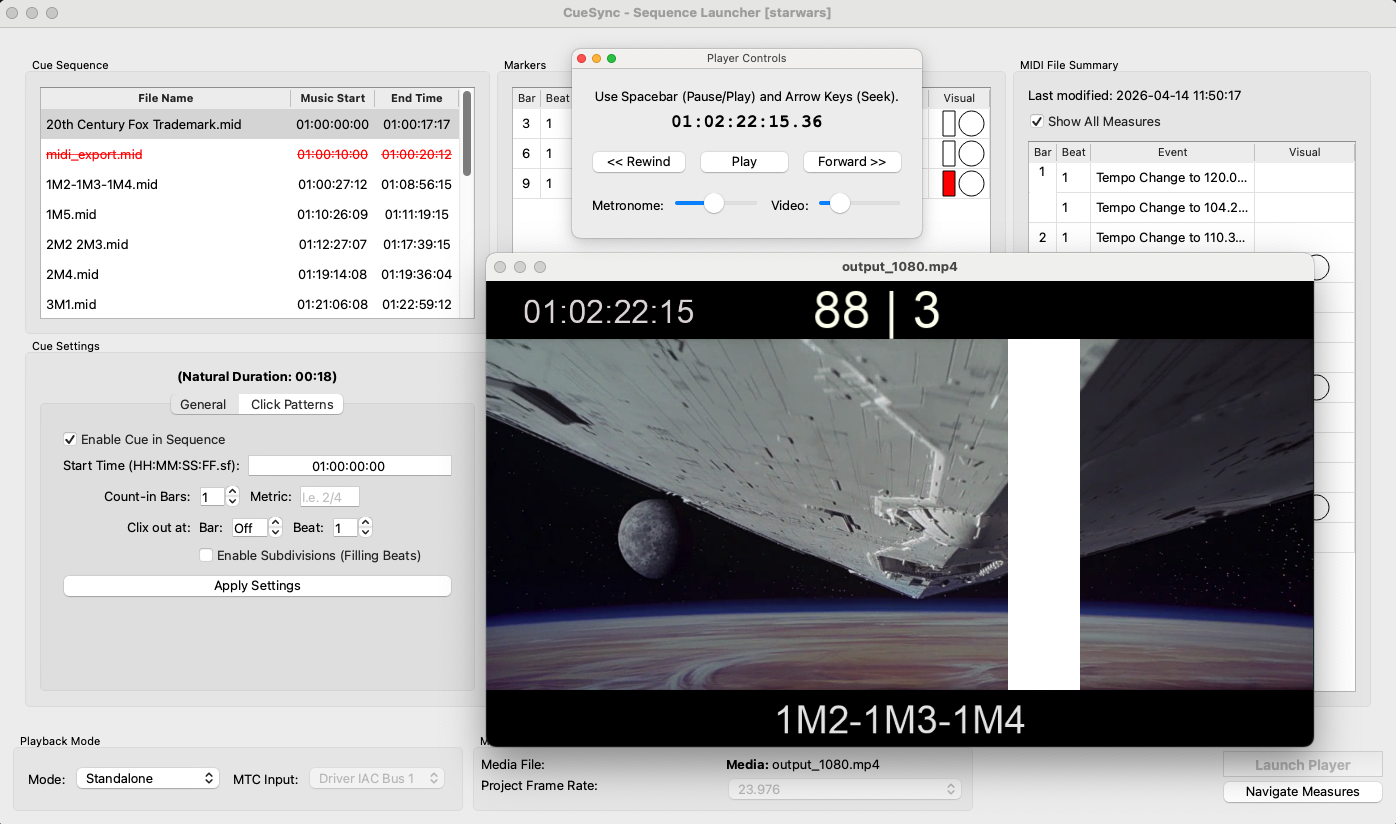
MIDI-synced streamers, punches, bar counters and clicktrack — standalone or synced to your DAW, in real time or burned into your video.

14-day money-back guarantee One-time payment · lifetime license
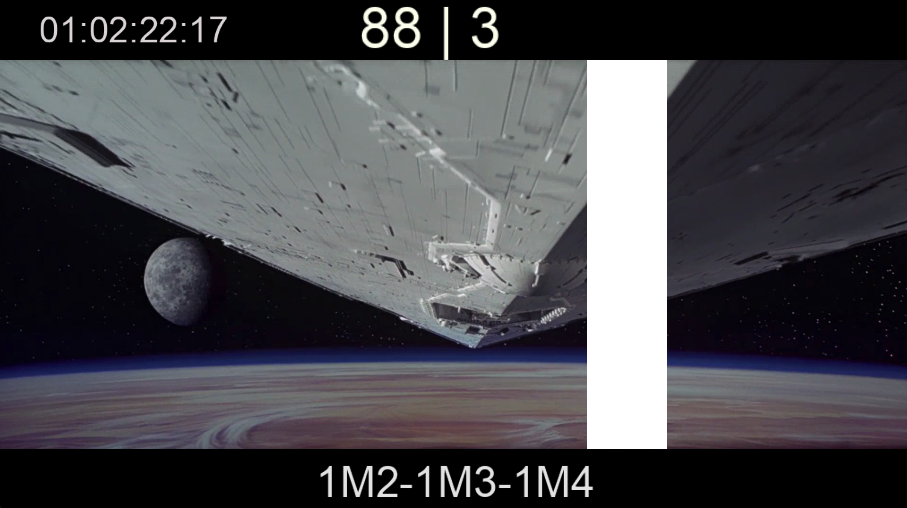
CueSync streamer overlay preview

Legacy streamer & punch tools were built for hardware and old operating systems — many no longer run on today's Macs. CueSync brings the classic streamers-and-punches workflow to a modern, native macOS app, whether you're on the scoring stage, conducting a live film-music concert, or spotting cues for ADR.

Everything you need on set

Streamers & Punches

Bars and flashes synchronized with frame-accurate timing to mark cues and cuts in the score.

Low-latency Metronome

Dedicated audio thread with pure-sine tones to keep the click stable regardless of GPU load.

Realtime Overlays on Video

Watch your reference movie with all overlays (streamers, punches, counters) in real time — ideal for film scoring sessions and spotting cues on set.

DAW Sync (MTC)

Sync CueSync as a slave to any DAW that sends MIDI Time Code (MTC) — Logic, Cubase, Pro Tools, Digital Performer and more.

Standalone Mode (No DAW Required)

Run CueSync independently using its internal master clock and metronome. Perfect for rehearsals, spotting sessions and simple setups without a DAW connection.

SMPTE Timecode

Configurable timecode origin to align video and visual clock to any reference.

Click Pattern Editor

Design accents for irregular meters (e.g. 7/8 = 3+2+2) and synchronize audio and visuals.

Marker Editor

Place Start/End markers, Streamers, Punches and meter changes directly on the MIDI timeline.

Visual Pre-roll

Yellow/green bars and frame-by-frame wipes to guide the director during the countdown.

Export Video

Render MP4 with burned-in markers. 1080p/4K presets and partial exports by SMPTE.

Audio Output & Calibration

Choose output device and automatic audio-visual latency calibration.

Preferences & Customization

Control overlays, streamer styles, text, colors and pre-roll behavior from Preferences.

Five steps to a scored session

  1. 01

    Organise your project folder

    Place all .mid files in one folder alongside an optional cues.json.

  2. 02

    Load video & MIDI

    Select your project directory and reference video (or use a black background). Set FPS to match your DAW.

  3. 03

    Edit the cue sequence

    Set SMPTE start times, count-in bars, and metric for each cue in the Sequence Editor.

  4. 04

    Place markers

    Add streamers, punches and meter-change annotations bar-by-beat directly in the Marker Editor.

  5. 05

    Play or export

    Use Standalone mode (no DAW required) for rehearsal or export a burned-in .mp4 to share.

Demos

Short demo videos showcasing CueSync features. Click any poster to play a sample.

Demo footage used for illustrative purposes only. All trademarks and copyrights belong to their respective owners.

CueSync visual conductor in action with streamers and punches
Demo 1 — Streamers & punches synced to picture

Frequently asked questions

Which DAWs does CueSync work with?

Any DAW that outputs MIDI Time Code (MTC): Logic Pro, Cubase/Nuendo, Pro Tools, Digital Performer, Ableton Live and others. CueSync runs as a slave to your DAW's transport.

Do I need a DAW to use it?

No. Standalone mode uses CueSync's own master clock and metronome, so you can rehearse, spot cues or run a live show without any DAW connected.

What are the system requirements?

A Mac running macOS 13 (Ventura) or later, Apple Silicon or Intel (universal binary). License activation may require an internet connection.

Is there a Windows version?

Not yet — CueSync is currently a native macOS application. If you'd like a Windows version, email us; it helps us prioritise.

What does the license cover?

A one-time payment gives you a lifetime license for the major version you buy (1.0), for one user on up to two Macs. Updates within that version are included while the product is actively maintained.

Can I get a refund if it doesn't fit my workflow?

Yes. If CueSync isn't right for you, email us within 14 days of purchase for a full refund — no questions asked. See our Refund Policy.

Is it suitable for live film-music concerts?

Yes. Streamers, bar counters and a free-time clock can be shown on stage monitors to cue conductors and players, making CueSync useful well beyond the scoring stage.

Get CueSync

CueSync for macOS

Professional macOS application for synchronizing musical scores with film and video — for scoring sessions, ADR and live orchestral performance.

€149 — one-time payment · VAT included
Lifetime license for version 1.0

14-day money-back guarantee Try it in a real session. If it's not for you, email us within 14 days for a full refund — no questions asked.
  • Lifetime license for the version purchased
  • 1 user / up to 2 Macs
  • Professional use allowed (studios, orchestras, individuals)
  • Updates included while the product is actively maintained
Buy CueSync — €149 Learn more

System requirements

  • macOS 13 (Ventura) or later
  • Apple Silicon or Intel (universal binary)
  • Internet connection may be required for activation

By purchasing, you agree to the Terms of Service and Privacy Policy.

Who's behind CueSync

I'm Daniel, an electrical engineer and film-scoring enthusiast. I built CueSync because I needed a reliable, modern way to run streamers and punches on today's Macs and couldn't find one. It's built by someone who actually uses it on sessions — and I answer support emails personally.

Contact & Support

Support

Email: info@cuesynclab.com

If you encounter any problem, please write to us describing the issue in as much detail as you can and, if possible, attach a short video or screenshots that show the problem. This helps us reproduce and fix it faster. We usually reply within 24 hours.